

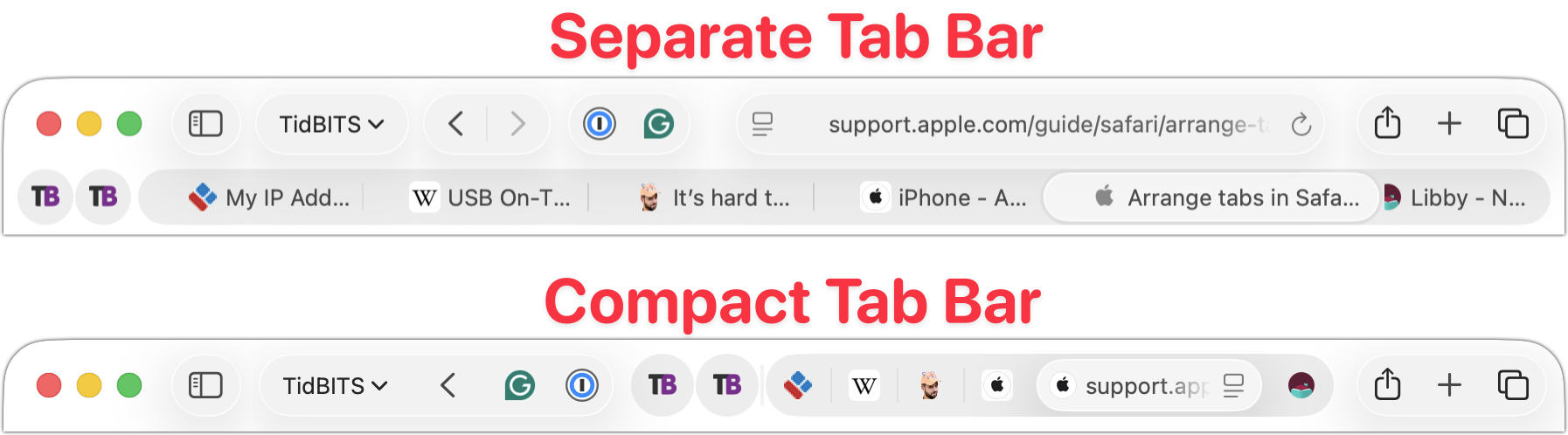
Safari’s compact tab bar option, which saves vertical space by placing the address bar in the current tab, went missing in the initial releases of macOS 26 Tahoe and iPadOS 26. Only Apple knows why this helpful option disappeared (Liquid Glass?), but as of macOS 26.4 and iPadOS 26.4, it’s back! On the Mac, select it in Safari > Settings > Tabs; on the iPad, look in Settings > Apps > Safari.
(Featured image based on an original by iStock.com/czekma13)
Social Media: Those who have been missing Safari’s compact tab bar are in luck—it’s back as of macOS 26.4 and iPadOS 26.4. The compact tab bar is a welcome way to save vertical space for content.
Recent Posts

Jul. 03, 2026
Never Miss a Meeting Again with In Your Face

Jul. 03, 2026
Drag Documents to Apps in the macOS App Switcher

Jul. 03, 2026
Try Swipe Typing with QuickPath on the iPhone
Jul. 03, 2026
Share Your Location Temporarily While Traveling

Jul. 03, 2026
Understanding AI Today: No Longer Just a Chatbot
Jul. 03, 2026
Control Center Is Improved—and Highly Customizable—in macOS 26 Tahoe

Jul. 03, 2026
Apple Raises Prices on Macs and iPads, but not iPhones or Apple Watches… Yet

Jul. 03, 2026
How to Share Sensitive Information Securely over the Internet

Jun. 09, 2026
10 Reasons to Upgrade to Apple’s Version 27 Operating Systems This Fall

Jun. 05, 2026
Use Fake Contacts to Improve Dictation Accuracy
View All Posts