

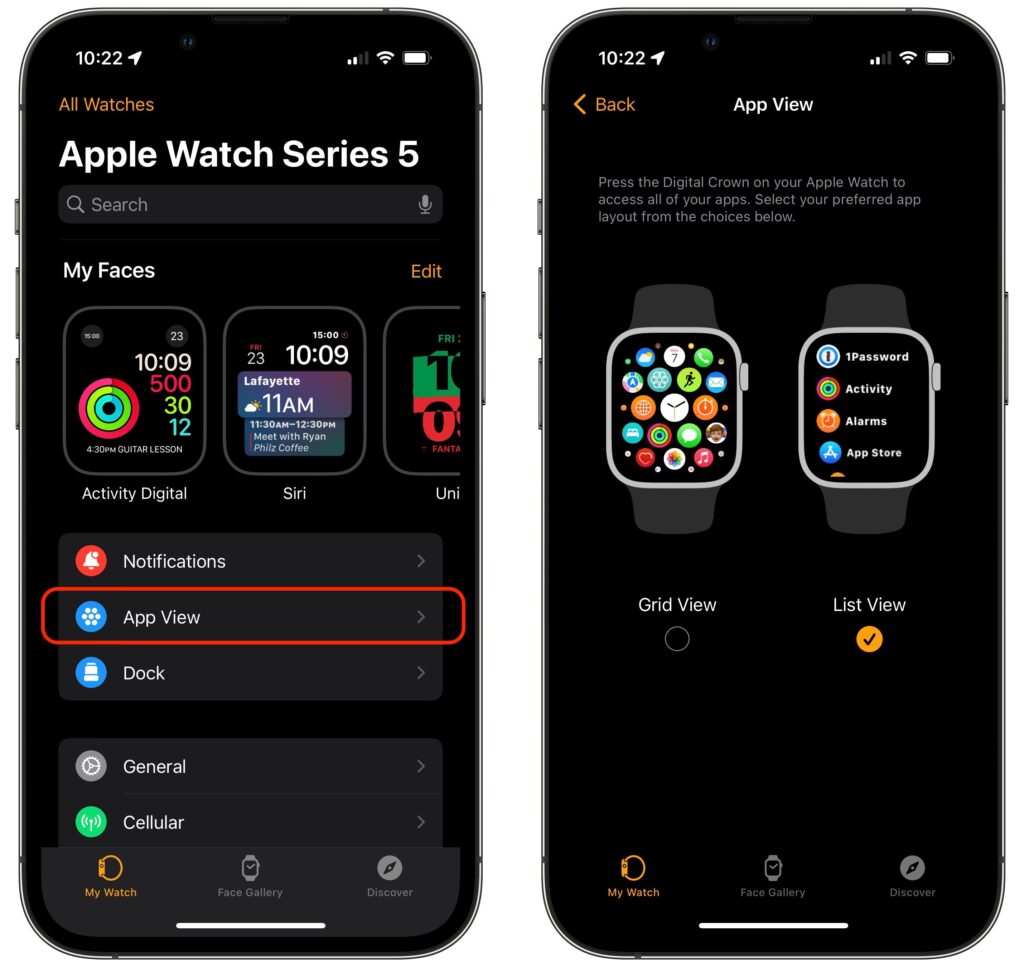
Every so often, we encounter someone struggling to find and launch an app on their Apple Watch because they have trouble seeing and interacting with the icon-centric grid view layout. If you’re in that camp, there’s a better way. In the iPhone’s Watch app, tap My Watch at the bottom, and then tap App View. Then select List View, which provides an alphabetically sorted, scrolling list of all your apps. From then on, it’s easy to press the Digital Crown to show the apps, turn it to scroll, and tap an app to launch it.
(Featured image by iStock.com/raditya)
Recent Posts

Jun. 09, 2026
10 Reasons to Upgrade to Apple’s Version 27 Operating Systems This Fall

Jun. 05, 2026
Use Fake Contacts to Improve Dictation Accuracy

Jun. 05, 2026
Office 2019 for Mac Goes Read-Only on July 13, 2026

Jun. 05, 2026
Not Sure If You’re Presentable for a Video Call? Try Hand Mirror

Jun. 05, 2026
Use Your AirPods as a Camera Remote

Jun. 05, 2026
When Should You Upgrade Your Apple Devices?

Jun. 05, 2026
How AI Vulnerability Detection Changes Software Security
Jun. 05, 2026
Choosing the Best Mac for a College-Bound Student in 2026
May. 01, 2026
Choose Default Apps for File Types in iOS 26 and iPadOS 26

May. 01, 2026
Never Run AppleScripts from Untrusted Sources
View All Posts